n8n
Building an AI Sales Assistant for a Facebook Shop with n8n, Google Sheets and Gemini
How I automated customer replies and order taking for Crafted Glow Lab on Facebook Messenger, including every mistake along the way and how I fixed it.
Contents
Building an AI Sales Assistant for a Facebook Shop with n8n, Google Sheets and Gemini
At a glance
| Client | Crafted Glow Lab (handmade candles, soaps and skincare, sold on Facebook) |
| Problem | Customers ask the same questions all day and orders get lost in the inbox |
| Solution | An AI assistant on Facebook Messenger that answers from a Google Sheet and takes orders |
| Stack | n8n, Google Sheets, Google Gemini, Meta Messenger Platform, Docker, Caddy |
| Hosting | Self-hosted n8n on a cloud server |
| Status | Working end to end; going through Meta App Review for public launch |
The problem
Crafted Glow Lab sells through its Facebook page. Like most small Facebook shops, almost every message is one of a few questions:
- "What's the price?"
- "Is this in stock?"
- "How much is delivery outside Dhaka?"
- "Do you take bKash?"
Answering these by hand takes hours. Replies slow down at night, and some customers leave before anyone answers. Orders were also scattered across chat threads, so it was easy to miss a phone number or an address.
The owner wanted three things:
- Instant answers at any time of day, in the customer's own language (English, Bangla or Banglish).
- One place to manage products, so updating a price shouldn't mean touching any code.
- Orders captured in a structured way, ready for delivery.
The solution
I built an AI sales assistant on Facebook Messenger, powered by n8n.
The core idea is simple: the Google Sheet is the brain. The owner keeps three tabs:
- Products: name, price, discount price, stock status, description, variants
- FAQ: delivery charges, payment methods, return policy, business hours
- Orders: filled in automatically by the bot
Every time a customer sends a message, the workflow reads the latest version of the sheet. So when the owner changes a price, the next customer immediately gets the new price. There's no syncing step and no "please update the bot."
How a conversation flows
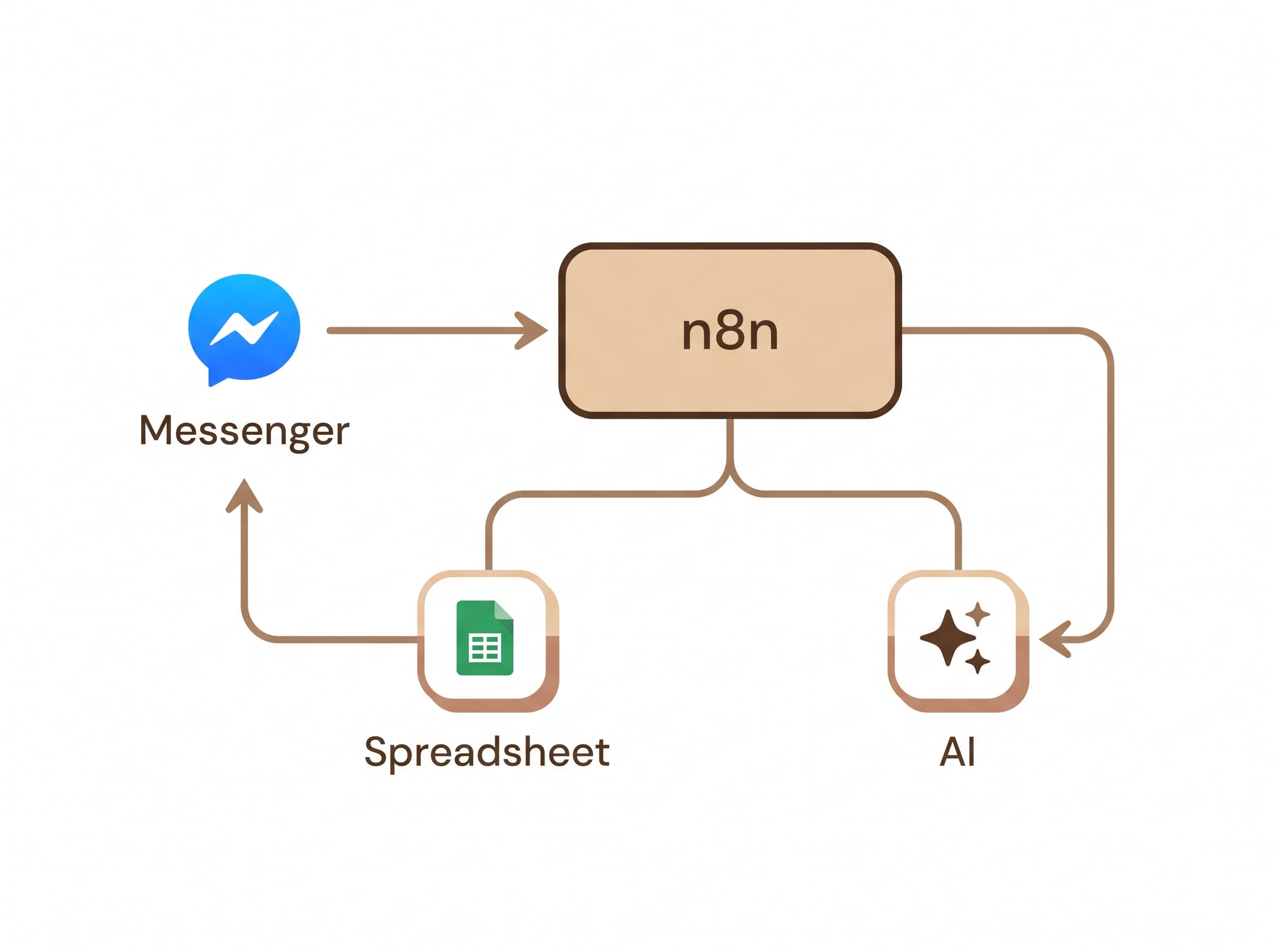
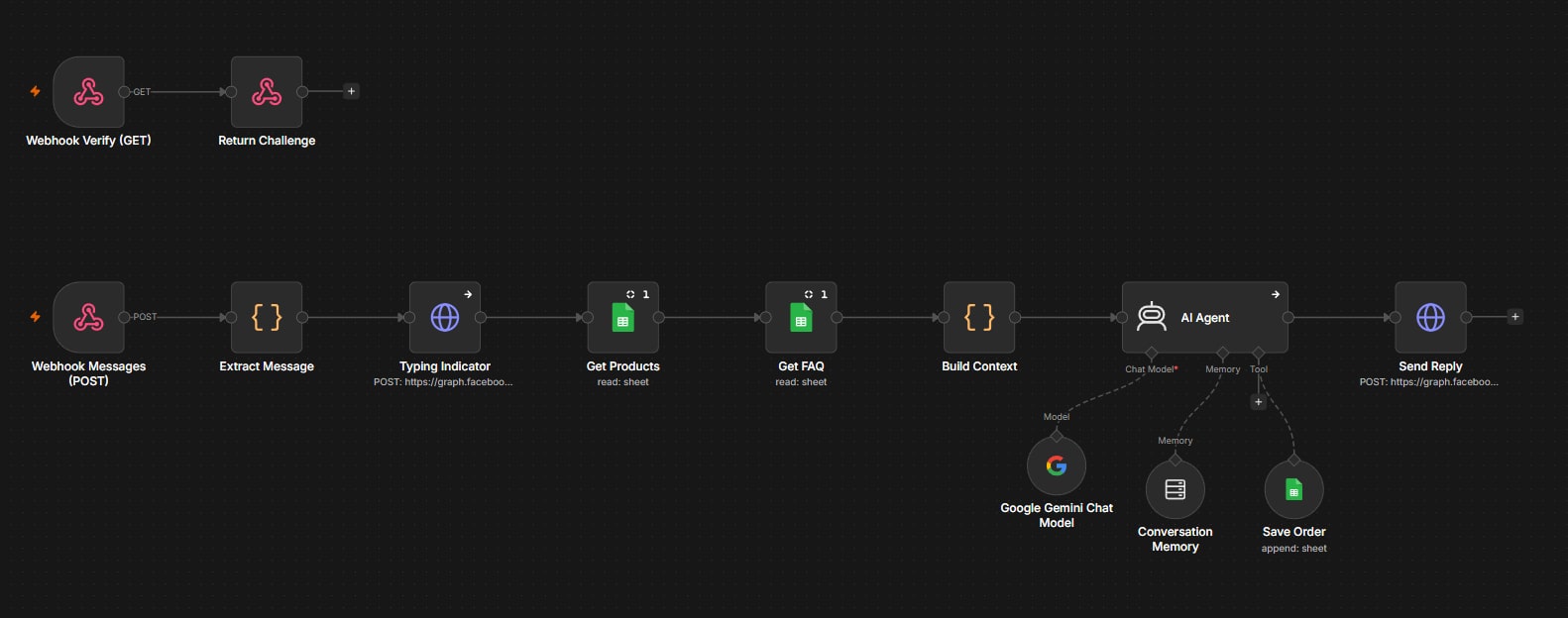
- A customer messages the Facebook page.
- Meta sends the message to an n8n webhook.
- n8n shows a "typing…" indicator, so the customer knows someone is replying.
- n8n reads the Products and FAQ tabs.
- An AI Agent (Google Gemini) writes a reply using only that data. It also remembers the last few messages in the conversation, so "I'll take 2 of those" works.
- If the customer wants to buy, the agent collects product, quantity, name, phone, address and payment method a little at a time. Then it repeats the full order and total back to the customer.
- Only after the customer confirms does the agent save the order to the Orders tab.
- The reply goes back to Messenger.
Guardrails I built into the AI
A sales bot that makes up prices is worse than no bot at all. So the system prompt is strict:
- Answer only from the product list and the FAQ. Never invent products, prices, discounts or delivery times.
- If the answer isn't in the data, say a team member will reply soon.
- Use the discount price when one exists. If a product is out of stock, say so and suggest a similar product that's in stock.
- Reply in the customer's language, with short, warm, plain-text messages.
- Save an order only once, and only after an explicit confirmation.
Implementation, and every mistake along the way
This is the honest part. The workflow logic took an afternoon. Getting it reliably online took much longer. Here's what went wrong and how each problem was solved.
Mistake 1: Free hosting that forgot everything
What happened: I first hosted n8n on a free cloud web service. It ran, but every time I changed a setting, the n8n account and workflow vanished. I got a fresh "create account" screen twice.
Why: n8n saves everything (users, workflows, credentials) in a small database file inside the container. The free plan has no permanent disk, so every restart wiped that file. The service also went to sleep after 15 minutes without traffic, which would have caused the same wipe.
Fix: I connected n8n to an external Postgres database, so data survived restarts. I also set a fixed N8N_ENCRYPTION_KEY. Without it, saved credentials can't be unlocked after a restart, even if the database survives.
Lesson: on any host, check where your data actually lives before building anything on it.
Mistake 2: The database password that "wasn't wrong"
What happened: n8n kept crashing with password authentication failed. First it was trying to log in as the default user postgres, because the user variable name was misspelled. After I fixed that, it still failed, even after resetting the password.
Why: the database provider had created two branches (production and development). Each had its own password and address. I had reset the password on one branch while n8n was pointed at the other.
Fix: I copied one connection string from the provider and split it into host, user, password and database. That way every value came from the same branch, and it connected on the first try.
Lesson: when credentials "should" work, the problem is usually a mismatch between where values came from, not the values themselves.
Mistake 3: Webhook verified, but no messages arrived
What happened: Meta's webhook verification succeeded, but real messages never reached n8n.
Why: there were two separate problems:
- The page wasn't actually subscribed to the app's messages. Turning on the "messages" field at app level isn't enough; the page itself also has to be linked to the app.
- While debugging, I'd been using a personal user token instead of a Page token. The Graph API Explorer quietly uses your personal profile unless you specifically choose the page token.
Fix: I generated a proper Page token from me/accounts, extended it into a never-expiring Page token, and confirmed the page subscription.
Diagnostic trick that saved hours: I sent a fake request to the webhook myself, using a free online HTTP tool. The workflow received it, which proved n8n was fine and the problem was on Meta's side. Splitting a problem in half like this is the fastest way to find it.
Mistake 4: The AI model had been retired
What happened: everything worked up to the AI step, which failed with 404 model not found.
Why: the Gemini model in my template had been retired for new accounts.
Fix: I switched to the current model the error message recommended.
Lesson: AI model names change often. Read error messages closely, because they often contain the fix.
Mistake 5: "Model is experiencing high demand"
What happened: some messages got no answer because Gemini returned 503 Service Unavailable at busy times.
Fix: I added three layers of protection:
- Automatic retries: 3 attempts, 3 seconds apart.
- A safe fallback: if the AI still fails, the agent continues anyway and the customer gets a polite "our team will reply shortly" instead of silence.
- A paid API key for production, so requests get priority when the service is busy.
Lesson: never build a customer-facing flow where one failed API call means silence.
Mistake 6: Slow because of geography
What happened: after moving n8n to a free virtual server, everything was painfully slow, and Meta's webhook verification kept failing.
My first guess was wrong. I assumed Meta was blocking the free wildcard domain I was using (sslip.io). The execution log proved me wrong: Meta's request was reaching the server, with Facebook's user-agent and the correct challenge. It just wasn't getting an answer fast enough.
The real cause: the server was in the USA, but the database was in Singapore. Every single step crossed the Pacific Ocean twice.
Fix: I switched n8n to its built-in database, stored on the server's own disk. Speed improved immediately, and Meta verification passed.
Lesson: check the logs before trusting your theory, and keep your app and its database in the same region.
Mistake 7: A free server is fine for testing, not for selling
What happened: the free 1 GB server occasionally froze, and the n8n editor was slow.
Fix: I added swap memory, turned off unneeded background features, and limited execution history. For production, the plan is a small 4 GB server, which costs about the same as a cup of coffee per month.
Lesson: "free" is great for proving an idea. A business that loses orders when the server freezes needs reliable hosting.
The result
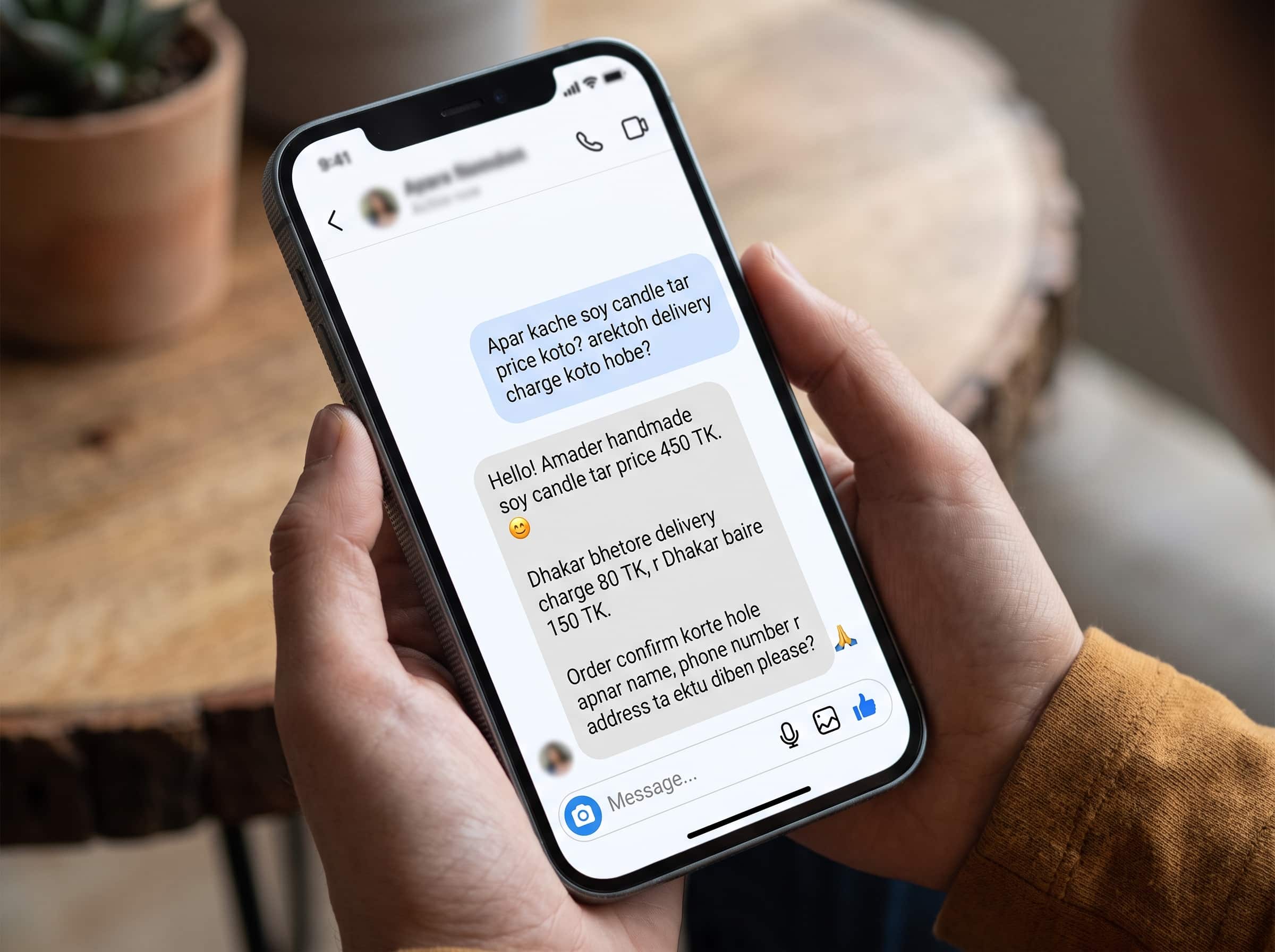
- Customers get instant, accurate answers at any hour, based on live sheet data.
- Product, price and stock updates take seconds in a spreadsheet, with no code changes.
- Orders arrive in the Orders tab with name, phone, address, items, total and payment method, ready for delivery.
- The bot fails gracefully: if the AI is unavailable, customers still get a polite reply.
- The owner manages everything from tools they already know: Facebook and Google Sheets.
Tech stack
| Layer | Tool |
|---|---|
| Automation | n8n (self-hosted, Docker) |
| HTTPS / reverse proxy | Caddy (automatic SSL) |
| Data | Google Sheets (via a service account) |
| AI | Google Gemini, through the n8n AI Agent with conversation memory |
| Channel | Meta Messenger Platform (webhooks + Send API) |
| Hosting | Cloud virtual server (Ubuntu) |
Key takeaways
- Keep the business data where the owner already works. A spreadsheet beats a custom admin panel for a small shop.
- Strict prompts plus real data stop the AI from making things up. The AI writes the sentences; the sheet decides the facts.
- Confirm before writing. Saving an order only after explicit confirmation prevents junk rows.
- Design for failure. Retries, fallbacks and a polite default reply matter more than a clever prompt.
- Test one half of the system at a time. Sending a fake request yourself shows quickly which side is broken.
- Logs beat guesses. My wrong theory about the domain would have cost a day. One execution log settled it in a minute.
What's next
- Meta business verification and App Review, so the bot can reply to every customer.
- Moving to a 4 GB production server.
- New-order alerts to the owner by email or Telegram.
- A "human takeover" mode that pauses the bot when the owner replies manually.
- Sending product photos when a customer asks to see an item.
Want a similar AI assistant for your Facebook or Instagram shop? Get in touch.
Tags
- n8n
- automation
- AI agents
- Facebook Messenger
- Gemini
- Google Sheets
- case study
Written by
Fuad Hasan Emon. I build full-stack products and AI automation. See my work or start a conversation.