Product Development
I Turned My Portfolio Into a Real Product
Why I stopped treating my portfolio as a static website and built a private CMS, database-backed projects, publishing workflow, and SEO infrastructure instead.
Contents
I Turned My Portfolio Into a Real Product
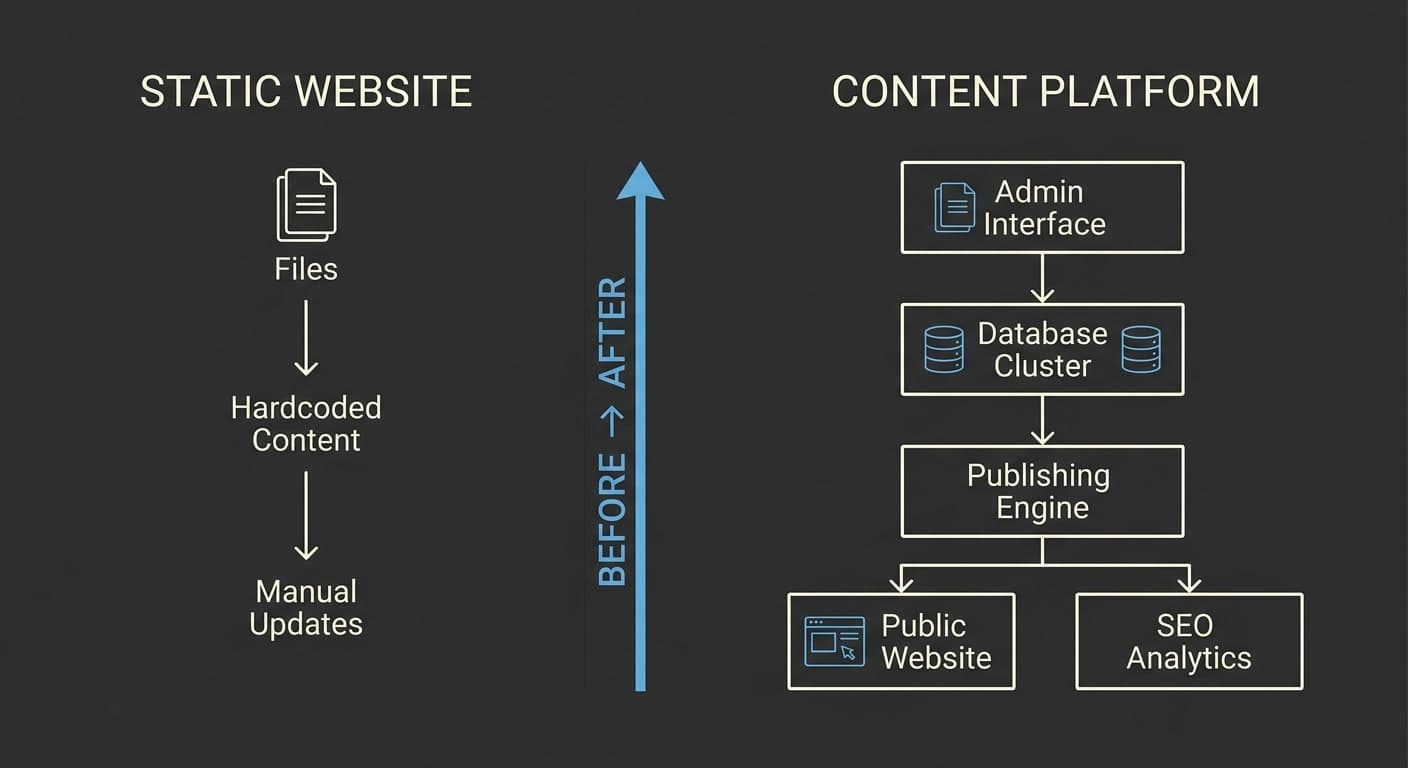
A portfolio can be just a website.
Or it can become a small product.
When I started working on my portfolio, the obvious approach would have been to build a collection of pages, put my projects into components, write a few case studies, and deploy it.
That would have worked.
But there was a problem.
Every content change would require changing code.
Adding a project meant editing files.
Changing project order meant editing files.
Publishing a new article meant editing files.
Updating metadata meant editing code.
At some point, the website stops being a portfolio and starts becoming a maintenance task.
So I decided to change the architecture.
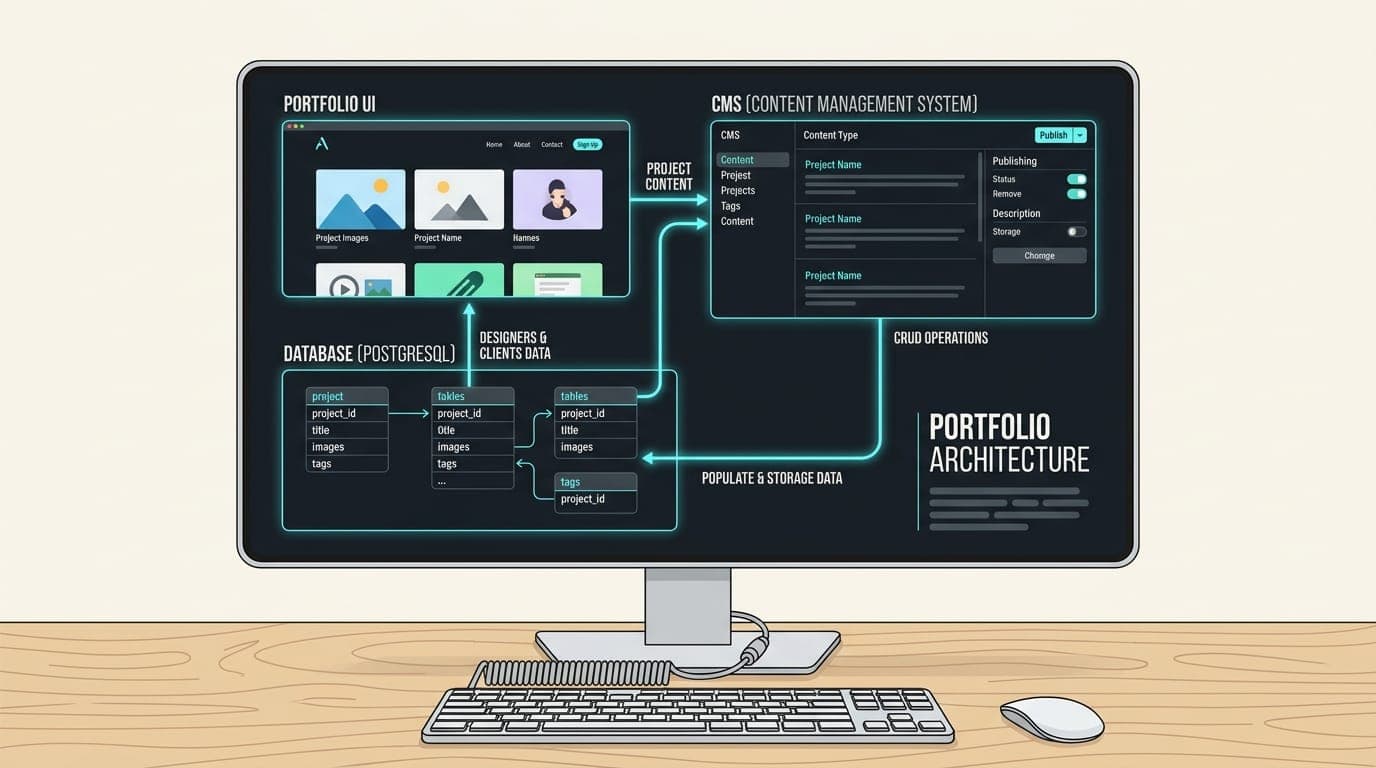
Instead of building only a portfolio frontend, I built a small content platform behind it.
The goal
The goal wasn't to build a full CMS like WordPress.
That would have introduced complexity that the project didn't need.
I wanted something focused.
The system needed to let me:
- manage projects
- reorder projects
- create blog posts
- save drafts
- publish articles
- edit SEO metadata
- upload images
- manage content privately
- keep the public website fast
That gave me a much clearer architecture.
                    ┌──────────────┐
                    │    Admin     │
                    │   Dashboard  │
                    └──────┬───────┘
                           │
                           ▼
                    ┌──────────────┐
                    │    API /     │
                    │ Server Logic │
                    └──────┬───────┘
                           │
             ┌─────────────┴─────────────┐
             ▼                           ▼
      ┌──────────────┐           ┌──────────────┐
      │   Postgres   │           │  Cloudinary  │
      │    / Prisma  │           │    Images    │
      └──────────────┘           └──────────────┘
             │
             ▼
      ┌──────────────┐
      │ Public Site  │
      └──────────────┘
The important thing is that content and presentation became separate concerns.
Why PostgreSQL?
Projects and articles are structured content.
They have relationships.
A project might contain:
- title
- slug
- description
- category
- technologies
- image
- ordering
- featured state
A post might contain:
- title
- slug
- excerpt
- content
- cover image
- category
- tags
- publication status
- publication date
A relational database is a natural fit for this type of information.
The database became the source of truth for the content.
Prisma as the data layer
Instead of scattering SQL queries throughout the application, I wanted a consistent data access layer.
That's where Prisma fits into the architecture.
Conceptually:
React / Next.js
       ↓
Application logic
       ↓
Prisma
       ↓
PostgreSQL
The benefit isn't just convenience.
The schema becomes a documented representation of the application's content model.
When I look at the schema, I can understand what the product supports.
Neon
The PostgreSQL database is hosted using Neon.
That gives the project a managed Postgres environment while keeping the application architecture relatively simple.
The runtime database connection and direct database connection are treated separately.
Application runtime
       ↓
Pooled connection
       ↓
Neon

Migration / direct operations
       ↓
Direct connection
       ↓
Neon
Keeping those concerns separate is important once the application moves beyond local development.
The private admin
The public website is only one side of the product.
The other side is the admin interface.
I wanted the admin area to stay intentionally small.
There are no unnecessary roles.
There isn't a complicated permission system.
There isn't a multi-tenant organization model.
There is one private administrative workflow.
That keeps the product aligned with its actual use case.
Authentication
The admin dashboard needs to be private.
Authentication is therefore handled before protected admin functionality becomes accessible.
The basic flow is:
Admin login
    ↓
Credentials verified
    ↓
Authenticated session
    ↓
Protected admin routes
The authentication system uses a secure password hash and a signed HTTP-only cookie.
The important part is not the specific implementation.
The important part is that authentication secrets never become part of the public client bundle.
Drafts and publishing
One of the most useful improvements was separating writing from publishing.
An article doesn't need to become public immediately.
That creates a simple state machine:
Draft
  │
  │ publish
  ▼
Published
  │
  │ unpublish
  ▼
Draft
This seems small.
But it changes how content can be created.
I can work on an article, preview it, improve the structure, check the metadata, and only then publish it.
Project ordering
Projects also needed to be reorderable.
Rather than hardcoding the order, each project has an ordering value.
The admin interface allows drag-and-drop reordering.
The system then persists that ordering.
That means the frontend doesn't need to know which project is supposed to appear first.
It simply asks the database.
Admin ordering
      ↓
Persist order
      ↓
Database
      ↓
Public query
      ↓
Sorted projects
This is a small example of why separating content from presentation is useful.
Markdown for articles
I didn't want article content to become a collection of complicated React components.
Markdown gives me a simpler editorial model.
The author writes content.
The application renders the content.
That keeps the content portable and relatively easy to maintain.
The article pipeline becomes:
Markdown
   ↓
Server-side processing
   ↓
Rendered HTML
   ↓
Editorial styling
The important distinction is that the content remains content.
The presentation layer controls how it looks.
Image handling
Images are not stored directly inside the database.
The database stores the information needed to reference them.
The actual media lives in Cloudinary.
So the architecture becomes:
Admin
  ↓
Upload
  ↓
Cloudinary
  ↓
Image URL
  ↓
Database record
This prevents the database from becoming an image storage system.
It also gives the media pipeline its own dedicated infrastructure.
SEO is part of the architecture
SEO shouldn't be something added after the website is finished.
For a content-driven portfolio, every article is a potential entry point.
That means each article needs:
- title
- description
- canonical URL
- Open Graph information
- publication metadata
- structured data
The site also has sitemap and robots infrastructure.
Next.js provides dedicated metadata mechanisms and sitemap support for these concerns.
The architecture therefore looks more like:
Article
  │
  ├── Content
  ├── Metadata
  ├── Structured Data
  └── URL
        │
        ▼
      Sitemap
The public site stays focused
One of the decisions I intentionally made was not to turn the CMS into a giant application.
I didn't need:
- comments
- newsletter management
- CRM
- analytics dashboard
- multi-user roles
- complicated workflows
- microservices
Every additional feature has a maintenance cost.
The goal was to solve the real problem, not demonstrate how many features could be added.
The result
The final system gives me two distinct products.
Content system
Admin
 ↓
Projects
 ↓
Articles
 ↓
Images
 ↓
SEO
 ↓
Publishing
Public experience
Home
 ↓
Work
 ↓
Project detail
 ↓
Blog
 ↓
Article
Both sides share the same content source, but they have different responsibilities.
What I learned
The biggest lesson was that a portfolio doesn't need to remain static just because its purpose is to present personal work.
Once content starts changing frequently, a content model becomes valuable.
Once content becomes structured, a database becomes useful.
Once content becomes public, publishing and SEO become part of the product.
And once all of those pieces exist, the portfolio starts behaving more like a real application.
That's exactly what I wanted.
Not because complexity is inherently better.
But because the architecture now reflects the way I actually use the website.
Final thoughts
A portfolio is supposed to communicate how you think.
Building this one gave me an opportunity to make the architecture itself part of that communication.
The result isn't just a collection of pages.
It's a small full-stack publishing system wrapped inside a personal portfolio.
And that was a much more interesting engineering problem to solve.
Tags
- Next.js
- Full Stack
- CMS
- Prisma
- PostgreSQL
- Product Development
Written by
Fuad Hasan Emon. I build full-stack products and AI automation. See my work or start a conversation.